Features
From first look to a clear yes.
Basefile follows your work from the moment you share it to the moment your client approves it. This is everything it does along the way.
Share
One link, and they’re in.
- Share one file or a whole project. Send its link to anyone you like, and switch it off, or swap it for a new one, whenever you want.
- Or invite people by email. One tap signs them in, with no account or password, and they see only what you shared.
- When they come back, everything you’ve shared with them is in one place, with what’s waiting on them first.
- See their view before you share, or send yourself the invite to check it.
- See who has opened each file. You hear the first time they do, and they can send you files too.

Review
Notes that point to the spot.
- Pin a note on an image, or on any page of a PDF. Or just write one.
- Illustrator, Photoshop, EPS, TIFF, SVG, HEIC and AVIF files open right in the browser, ready for notes.
- Videos play right there too. Click the picture to pin a note to that spot at that moment.
- Add a website by its address. Basefile captures it as a desktop and a phone show it, ready for pins on either.
- Zoom into the detail. The pins stay where they were put.
- Reply under any note, and tick it off when it’s done.
- Go from one file to the next, “2 of 6”, with the arrow keys or a swipe.
- On a phone it all works the same, with the notes in a sheet you pull up.

Versions
Every version, side by side.
- Upload the next version with a note on what changed. It goes on the same file, so the whole history is in one place.
- Your client sees the newest version first. The last round’s notes stay with the version they were on.
- Compare any two versions with a slider, or side by side. Your client can too.

Approval
A yes you can point to.
- Ask your client for their approval when you want it: Approve, or Ask for changes, with a note.
- Every approval gets its own record: the file, who approved it, when, which version, and their note.
- Save it as a PDF to keep with your files.
- Your client gets a thank-you with a link to the same record.
- A new version asks again, so a yes is always about what they saw.
- After a call, you can mark it approved yourself.

Follow-up
Always know whose move it is.
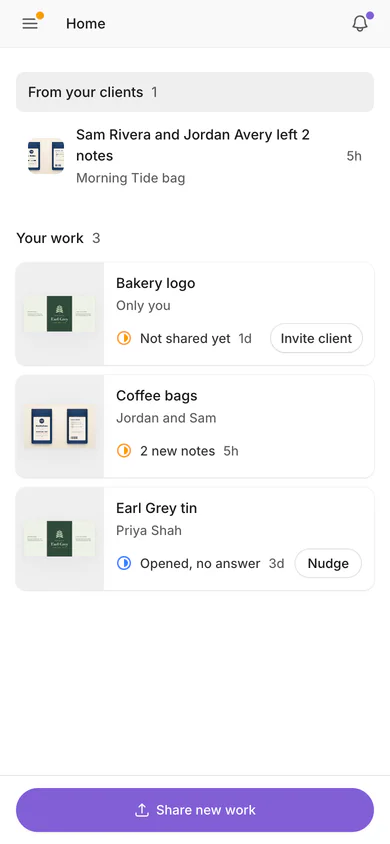
- Home opens on what your clients said: notes, changes asked for, files they sent, and their approvals. Then every project, with its newest file, saying whose move it is.
- When you ask for an answer, reminders go to your client in your name, after 2, 3, 5 or 7 days, three at most. Or never.
- Nudge sends one now, at most once a day.
- Notes, answers, uploads and first opens reach you in the app and by email, and as a push to your phone or computer if you like.
- A recap email daily, twice a week or weekly, if you want one.
Your workspace
Your brand, your way of working.
-
Your brand
Your name, logo, color and cover on everything your client sees, and on the emails they get.
-
Teammates
On Studio, up to five people share one account. You keep the plan, the team and the settings.
-
Who’s on it
Each project shows who on your team is on it, and they hear about everything there.
-
Only what you share
Files you haven’t shared never reach your client, and every download is checked against who’s asking.
-
Your data
Download a copy of your whole workspace whenever you like. We never train AI on your work.
-
Like an app
Put Basefile on your home screen or dock, in light or dark.